


Views: 0 Author: Site Editor Publish Time: 2026-05-25 Origin: Site


You can put in a crane remote control system by following easy steps and using the right tools. The LCC Q600 is a good choice for cranes, winches, and hoists. You should think about safety, if the system fits, and if the operator is comfortable when you install it. Make sure the signal works well and follow the rules to stop problems. This guide helps if you put in a new system or add one to an old crane.
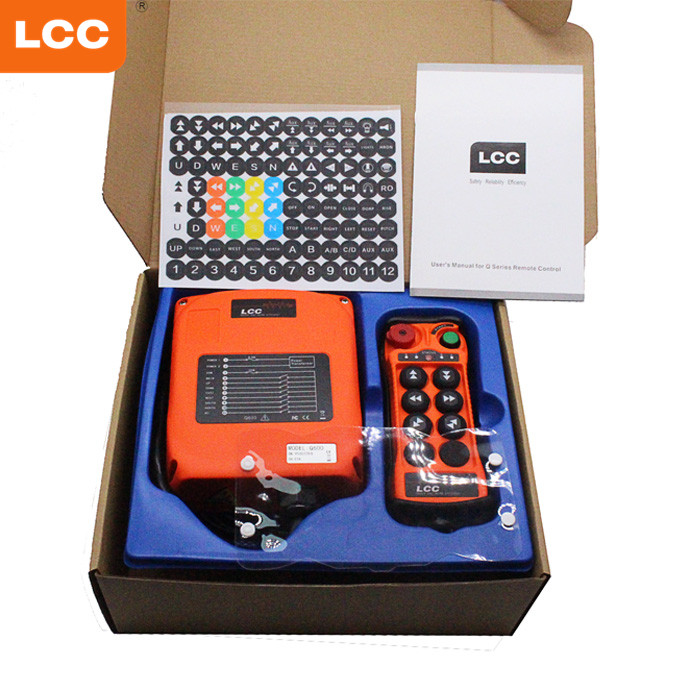
When you want to put in a crane remote control, you need the right tools and parts. The LCC Q600 6 Buttons Industrial Radio Remote Control is a good example of a new system. It works well with cranes, winches, and hoists. You can use this guide if you are setting up a new system or making an old one better.
You should get all your tools before you begin. Here is a list to help you:
Screwdrivers (flathead and Phillips)
Wire strippers and cutters
Electrical tape
Drill and drill bits
Wrenches and pliers
Multimeter for checking voltage
Mounting hardware (screws, bolts, brackets)
Safety gloves and goggles
Tip: Always wear safety gear when you work with electrical parts. This keeps you safe and helps stop accidents.
A normal crane remote control kit has many important parts. The LCC Q600 comes with all the main things you need for a safe setup. Here is a table that shows what you will find in most kits:
Component | Description |
|---|---|
Remote Controller | Lets you send commands to the crane using radio signals. |
Receiving Equipment Cabinet | Decodes the signals and sends them to the crane’s motor controls. |
Safety Features | Includes emergency stop buttons and safety zones for extra protection. |
Most crane remote control kits also have mounting brackets, wiring, and antennas. These parts help you set up the system and make sure it works far away. Many remotes let you lift, lower, and move the crane in different ways. The LCC Q600 is made to be easy to hold, so your hands do not get tired. Most systems have strong safety features, like emergency stops and safety zones, to keep your worksite safe.
Check your site and equipment before you start. This helps you stop problems later. First, see if the LCC Q600 remote control works for your crane. Look at how much weight your crane can lift. Make sure the system can handle the crane’s weight and movement. Always read the instructions from the company that made your crane and remote control. This makes sure everything works safely together.
Make sure the control system fits your crane’s load.
Check if the system can handle moving loads, like swaying or wind.
Read the instructions for both the crane and the remote control.
Now, look at where you will put the system. The LCC Q600 has an IP65 rating. This means it keeps out dust and water. Still, check for other dangers.
Dust, heat, wetness, and shaking can change how the remote works.
Make sure the area is clean and dry before you start.
Do not put the system near strong shaking or very hot places.
You also need to check the voltage and power supply. The Q600 works with many voltages. But you must make sure the voltage matches your equipment.
Safety is most important when you work with cranes and electricity. Always follow safety rules and wear safety gear. Use gloves and goggles to keep your hands and eyes safe. Never touch live wires. Turn off the power before you do any wiring.
Tip: Keep a fire extinguisher close when you work with electrical parts.
You should also check the supplier’s quality management information for crane remote control systems. For this article, the customer-provided standard reference is ISO9001.
Standard | Description |
|---|---|
ISO9001 | Supports quality management, process control, and consistent product inspection for industrial remote control products. |
Use ISO9001 as the quality management standard reference. For on-site wiring, installation, and crane operation, always follow the product manual, the crane manufacturer’s instructions, and local safety requirements.
Installing a crane remote control system helps you work safely and efficiently. You can follow these steps to set up the LCC Q600 or a similar system. Each step is important for a smooth installation.
Start by finding a good spot on your crane for the receiver. Choose a place that is easy to reach but safe from moving parts. The receiver should stay away from heat, water, and strong vibrations. Use the mounting brackets and screws that come with your kit. Make sure the receiver sits firmly and does not shake when the crane moves.
Check that the receiver is not blocked by metal objects. This helps the signal stay strong. You can use a drill to make holes for the brackets if needed. Tighten all screws so the receiver does not move.
Tip: A stable receiver gives you better control and keeps your remote control system working well.
Turn off all power before you start wiring. This keeps you safe. Use your wire strippers to remove the ends of each wire. Follow the wiring diagram in your manual. Connect each wire to the right terminal on the receiver. Use a screwdriver to tighten the screws.
Check the voltage on your crane and match it with the receiver. The LCC Q600 works with many voltages, so you can use it with different cranes. Wrap each connection with electrical tape to keep out dust and water.
You will also need to connect the antenna. Place the antenna in a spot where it can send and receive signals without blocks. Good antenna placement helps your crane remote control system work over long distances. You can use these tips for the best signal:
Keep the antenna straight and upright.
Place it as high as possible on the crane.
Make sure there are no metal objects close to the antenna.
Use the external antenna option if you need a longer range.
Modern remote control systems use smart ways to keep signals strong. They use frequency-hopping and error correction to stop interference. Good antenna setup helps you avoid signal problems and keeps your crane remote control working every time.
Now you can set up the transmitter. Put in the batteries or charge the transmitter if needed. Check that the buttons work and feel solid. The LCC Q600 has six buttons for different crane movements. Each button should match the right crane function.
Pair the transmitter with the receiver. Follow the steps in your manual. Usually, you press a button on the receiver and then a button on the transmitter. Wait for the signal light to show they are paired.
Test each button to make sure it sends a signal. If you use more than one remote control system, label each transmitter. This helps you know which one controls which crane.
Before you use the crane, test the whole remote control system. Start with a visual check. Look for loose wires, missing screws, or damaged parts. Make sure the receiver and transmitter are clean and dry.
You should do these tests to check your crane remote control:
Test the system for shock and vibration. The LCC Q600 can handle drops and bumps.
Check if the system works after a drop from one meter onto concrete.
Test the system in dusty, wet, or hot places to see if it still works.
Try each button and make sure the crane moves the right way.
Check for signal problems by walking around the work area with the transmitter.
Make sure the system passes electromagnetic tests. This stops radio or electric noise from causing problems.
Keep records of your tests and check that the installation follows the product manual, local site safety rules, and ISO9001 quality management records where applicable.
If you find any problems, fix them before you use the crane. Good testing keeps your team safe and your crane remote control system working for a long time.
Note: Always test your remote control system before each shift. This helps you find problems early and keeps your worksite safe.
You might have problems when you set up or use a crane remote control system. Knowing these problems helps you fix them fast and keeps your work safe.
The Emergency Stop button can stay pushed in. This makes the crane stop right away. Always check if someone pressed it by accident.
The remote may not work if it is not allowed. Make sure you pair the transmitter and receiver before you use them.
Power supply problems can make the system stop working. Check if the battery has enough power. Use the right battery type and put it in the correct way.
The receiver might not get power. Look at the power input and see if the AC or DC fuses are blown.
Sometimes, the transmitter and receiver cannot connect. Check the S/N codes and channel numbers. They must match for the system to work.
Signal loss can happen if the antenna is blocked or broken. Put the antenna high up and away from metal objects.
Tip: If the remote does not work, check the battery and power supply first. This fixes most problems.
Here is a simple checklist for troubleshooting:
Make sure the battery works and is put in right.
Check the battery box and its link to the circuit board.
Look at the receiver’s power input and fuses.
Check the wires between the receiver and relay module.
Make sure the transmitter and receiver use the same channel and code.
You can stop many problems by not making these mistakes:
Not doing safety checks before starting the system.
Using the wrong battery or putting it in backwards.
Forgetting to pair the transmitter and receiver.
Not checking for blown fuses or loose wires.
Putting the receiver or antenna near strong shaking or metal objects.
Not checking the Emergency Stop button status.
Note: Always follow the manual and safety rules. Careful setup and regular checks keep your crane remote control system working well.
You can put in a crane remote control system if you follow each step and use the right tools. Always check the system before you use it. Safety is very important. If you are not sure what to do, ask someone who knows more. Keep these safety tips in mind:
Stand far from the load
Use the emergency stop if needed
Make sure operators know how to use the system
A good system like the LCC Q600 helps you control the crane better. It also makes your hands less tired and lasts a long time.
You should check the voltage and load capacity. Read the manual for both your crane and the remote control. Make sure the system matches your crane’s requirements.
First, check the battery and power supply. Look at the wiring and fuses. Make sure the transmitter and receiver are paired. If you still have problems, contact professional support.
Yes, you can use it outdoors. The LCC Q600 has an IP65 rating. It works well in dusty and wet places. You should keep the receiver and transmitter clean and dry.
You should test the system before each shift. Check all buttons and safety features. Make sure the crane moves as expected. Regular testing keeps your worksite safe.
You should wear safety gloves and goggles. These protect your hands and eyes. Always turn off the power before you start working with wires.
Tip: Keep a fire extinguisher nearby when you work with electrical equipment.